Your fishing log, in your pocket
Fishing Notes is a fishing diary for anglers: log every catch with species, weight, length, photo and the spot you caught it, then watch your personal bests and your season build up on their own. Everything stays on your phone — no account, no sign-in, no server.
- Free, no sign-up
- Works offline
- 54 fish species
- Your data stays on your phone
Get it on Google Play Free · Android 7.0 and newer
A look inside the app
Six screens that cover most of what you will use: the species list with your records, the catch form, the catalog, statistics, the map and your gear.
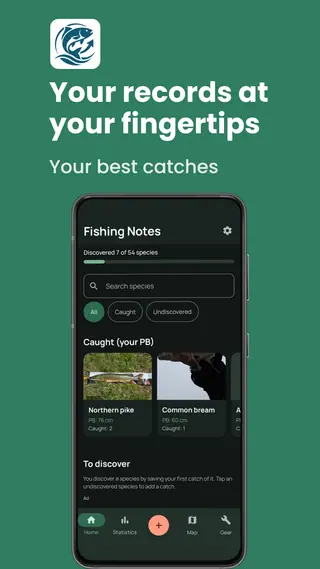
Every species you have caught, with your personal best on the card.
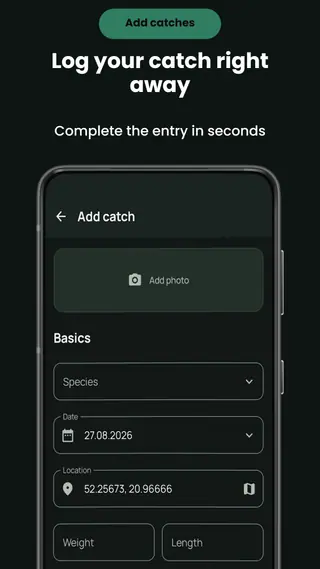
Log a catch in seconds — photo, species, date, spot, weight and length.
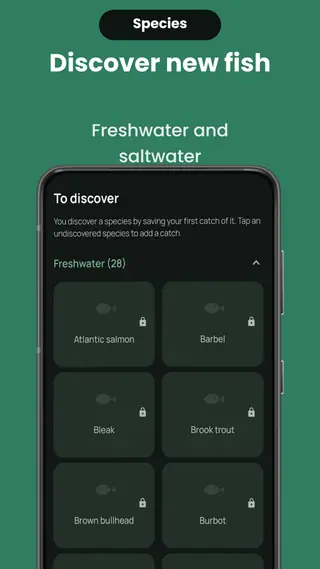
A catalog of 54 freshwater and saltwater species waiting to be discovered.
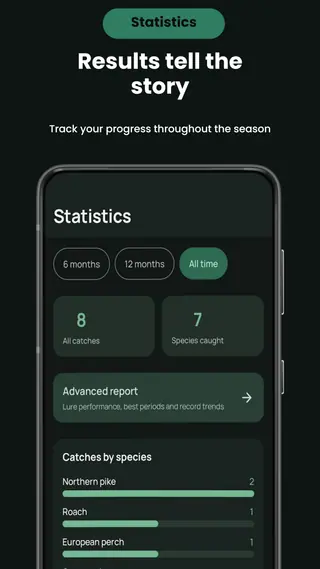
Your season in numbers: catches by species, method and month.
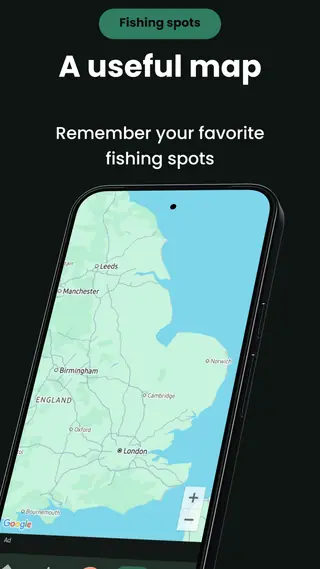
Every spot you saved, pinned on the map.
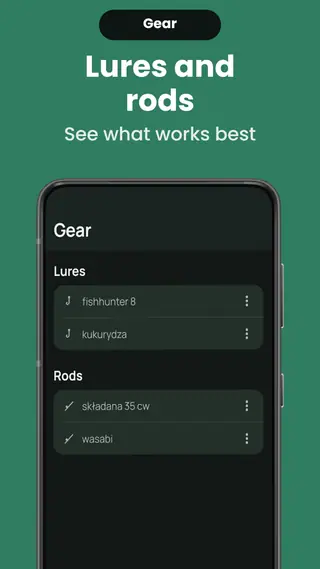
Lures and rods, collected automatically as you log catches.
What the app does
Everything below is in the free version. There is no subscription and nothing is locked behind a purchase.
Catch journal
Record every fish: species, weight, length, date, fishing method, lure and rod. The entry takes seconds, and you can go back and edit it whenever you like.
Personal bests
The app tracks your PB for weight and length in every species by itself. Beat a record and the card updates — you never have to remember what your best pike was.
Trophy photos
Add a photo from the camera or your gallery. If the picture carries a date, the app offers to use it, so a catch you log a week later still lands on the right day.
Fishing map
Save where you caught a fish and see all your spots on the map, each pin carrying the species and the date. Pick a spot by hand when you would rather not use GPS.
Statistics
Catches by species, by method, by month and by category, over the last 6 months, 12 months or all time. It is the quickest way to see what your season actually looked like.
Species catalog
54 freshwater and saltwater species, each one named in your language. Search is diacritic-insensitive, so “losos” finds the Atlantic salmon.
Discover new fish
Every species you have not caught yet sits in the catalog waiting. Save your first catch of it and it unlocks — a reason to try a water you would otherwise skip.
Your gear
The list of lures and rods builds itself from what you type into your catches. Rename an entry once and every catch follows; delete one by mistake and there is an undo.
Share a catch
Turn any catch into an image card with the species, the measurements and a personal-best badge, then send it wherever you like.
Advanced report
A deeper read of your history: which lures and methods actually bring the better fish, your strongest months, and how your records moved year by year.
Works offline
The journal needs no connection. You can log a fish at the far end of a lake with no signal and everything is there when you get home.
Backup you control
The app uses Android Auto Backup, so your catches and photos can ride along in the encrypted backup on your own Google Drive. It is your backup, on your account.
How it works
Three steps, and the app does the rest.
-
Install and open
No account, no e-mail, no sign-in screen. The app opens on the species list and is ready to use.
-
Log your catch
Pick the species, add weight and length, snap a photo and save the spot. Method, lure and rod are optional — fill them in and the statistics get sharper.
-
Watch it add up
Personal bests, species discovered, the map and the charts all build themselves out of the catches you saved.
54 species in the catalog
Freshwater and saltwater, each named the way you would name it. Anything the catalog does not know you can still type in by hand — the app never rejects a fish.
Freshwater (35)
Saltwater (19)
Every method you fish
Tag a catch with how you took it, and the statistics will tell you which method is actually working for you.
Advanced report
The statistics screen answers “what did I catch”. The advanced report answers “what should I do differently” — it is calculated on your phone, from your own history, and unlocked by watching a short video ad.
- Lure ranking by the quality of fish they bring, not by how often you used them
- The same ranking for fishing methods
- Your best months, corrected for how many seasons you actually fished them
- How your records moved year by year, and how often you beat them
- A season summary: days on the water, catches per day and your best single day
Your catches stay yours
Catches, photos and coordinates are stored on your phone. The app has no user account and no server of ours to send them to, so there is nothing for us to read, lose or sell. The parts that do reach out — the map and the ads — are named plainly in the policy, along with what they collect.
Speaks your language
The app ships in English, Polish, German, Dutch, Swedish, Danish and Norwegian, and picks one from your phone’s language list on its own. Fish names are translated too, so a pike is a Hecht, a Gädda or a Szczupak depending on who is holding the phone.
Questions people ask
Is the app free?
Yes. Every feature described here is in the free version. There is no subscription and no paid unlock; the app is funded by ads, and the advanced report is unlocked by watching a short video rather than by paying.
Do I need an account?
No. There is no registration, no e-mail and no sign-in screen. You install the app and start logging catches.
Does it work without an internet connection?
Yes. Logging catches, photos, statistics and personal bests all work offline. A connection is only needed to draw the map and to load ads.
Where are my catches stored?
In the app’s private storage on your phone. They are not uploaded to any server of ours, because there is no such server. If Android Auto Backup is on, Android may include them in the encrypted backup on your own Google Drive.
Can I move my catches to a new phone?
If Android Auto Backup is enabled, Android restores the app’s data when you set the app up on a new device as part of the usual restore flow. That backup lives on your Google account and is managed by you.
Which Android version do I need?
Android 7.0 or newer.
What if I catch a species that is not in the catalog?
Type its name in. The catalog is a convenience, not a gate — a catch with a species the app does not know is saved exactly like any other.
Does the app track my location in the background?
No. Location is read only at the moment you save a spot or pick one on the map. There is no background tracking of any kind.
Start your fishing log today
Free, offline, no account. Install it before your next trip and your first catch is already in the journal.
Get it on Google Play Free · Android 7.0 and newer
Contact
Questions, bugs, ideas for the next version? Write to mail@mojaryba.com.